


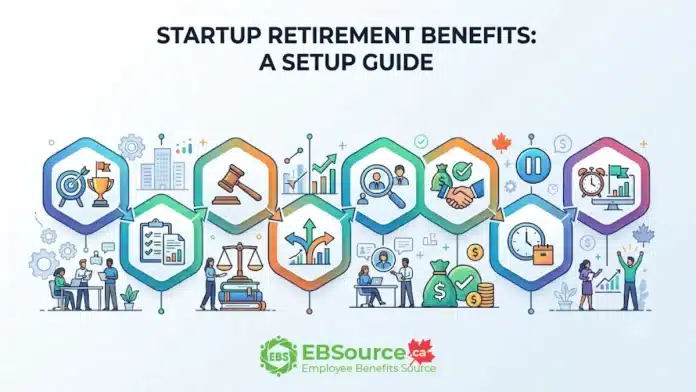
Setting up retirement benefits at an early-stage Canadian startup is easier when you tie every decision to the team and funding you have today, rather than the growth you hope to see in the coming years. A short readiness check first confirms whether retirement benefits are the right priority at your current stage. From there, a Growth Brief helps you do exactly that: over eight steps, you set a clear goal, gather real numbers, check the rules you cannot change, and test your design against growth and hiring plans before deciding what to offer now, what to hold for later, and when to revisit.
Read on to see how each step works in practice, from the first planning decisions through to the checks that keep your benefit on track after launch.
Startup Retirement Benefits Growth Brief
Workplace retirement benefits can be tricky for a startup, because headcount, payroll and funding can all change within a year. This guide works through that problem with a Growth Brief: a written plan your company completes step by step before it promises employees anything.
Note that the Growth Brief is a planning framework, not a government form or a legal requirement, so use it alongside the fixed rules in Step 3 and get professional advice where the article recommends it.
The table below works as a map of the retirement benefits for Canadian startups:
| Step | What you record | What it controls |
|---|---|---|
| 1. Set the goal | Leading goal, planning horizon, success targets | What “affordable” and “working” mean |
| 2. Confirm the inputs | Headcount, payroll, secured funding, employee needs, admin owner | What the design is tested against |
| 3. Check the fixed rules | Obligations the company can’t design around | What any design must respect |
| 4. Test growth scenarios | Cost and capacity under slow, expected, rapid and funding-delay cases | Which case breaks the design first |
| 5. Test the hiring plan | Target candidates, launch timing, new provinces, communication | Whether the design serves its purpose |
| 6. Approve what secured funding supports | Plan, provider, contribution, eligibility, launch, owner, communication | What may be promised |
| 7. Defer the rest | Conditional items, each with a condition and a checker | What waits for evidence or funding |
| 8. Set review triggers | Measurable thresholds with owners | When the design is reopened |
The sections below walk through each step in the same order, starting with the goal the benefit is meant to serve.
Step 1: Set the Goal for Your Startup’s Retirement Benefit
Before you explore providers or calculate any figures, decide three things: the benefit’s main goal, the planning horizon, and the measures that will show whether it is working. A retirement benefit aimed at attracting new candidates will look very different from one designed to retain current employees or help them save for the future. Skipping this step makes it hard to evaluate whether the plan is worth the cost later.

Here are three you should confirm before planning retirement benefits at your startup:
Choose One Goal: Attract, Retain or Build Savings
A retirement benefit for a small business can attract candidates, keep the people you already have, or help employees build savings they would not build alone. All three goals are valid; however, each one leads to a different retirement plan design, and a startup’s budget may not cover all three well at launch.
Here’s what each goal typically involves:
- Attraction focuses on offering a visible employer contribution that you can mention in a job offer, implement before recruitment efforts, and explain succinctly.
- Retention emphasizes a waiting period, a contribution that grows with tenure, and, where the plan type permits it, vesting terms. Vesting is not available in every plan type.
- Long-term savings prioritizes broad eligibility, simple defaults and financial literacy support over a large employer contribution.
Pick one goal to lead. The other two can be secondary, but the leading goal decides the trade-offs in the subsequent steps.
Match the Planning Horizon to Available Funding
When planning retirement benefits, your timeline should not exceed the period that your hiring plan and secured funding can reliably support. Choose a planning horizon your available funding and committed hiring plan can support; shorten it if cash availability is uncertain.
If the horizon is too long: You risk depending on funding that you anticipate but do not currently have.
If the horizon is too short: You may not see enough hiring, enrolment or provider renewal activity to collect enough participation and employee feedback to evaluate the benefit.
Set Targets for Participation, Feedback and Budget
Once you know what the retirement benefit is for, you need a way to tell whether it is working. Set a target for each before the first year’s results come in, so you have something to measure against later.
The three measures to track with a target for each are:
- Participation: the share of eligible employees enrolled and contributing, tracked by class and location.
- Employee feedback: whether staff understand the benefit, and whether candidates mention it in offer discussions.
- Budget sustainability: employer contribution and administration cost as a share of payroll, tracked monthly.
Step 2: Confirm the Inputs Before Testing a Retirement Benefit Design
The next job is to get honest numbers on where your company stands today. Every test in the steps ahead depends on these figures, so it’s worth getting them right before you compare plans or talk to providers.
You will focus on these four key areas: who is on your payroll right now and what you pay them; how much money the company can actually rely on; what your employees and candidates really want from a benefit; and who on your team will run it day-to-day.
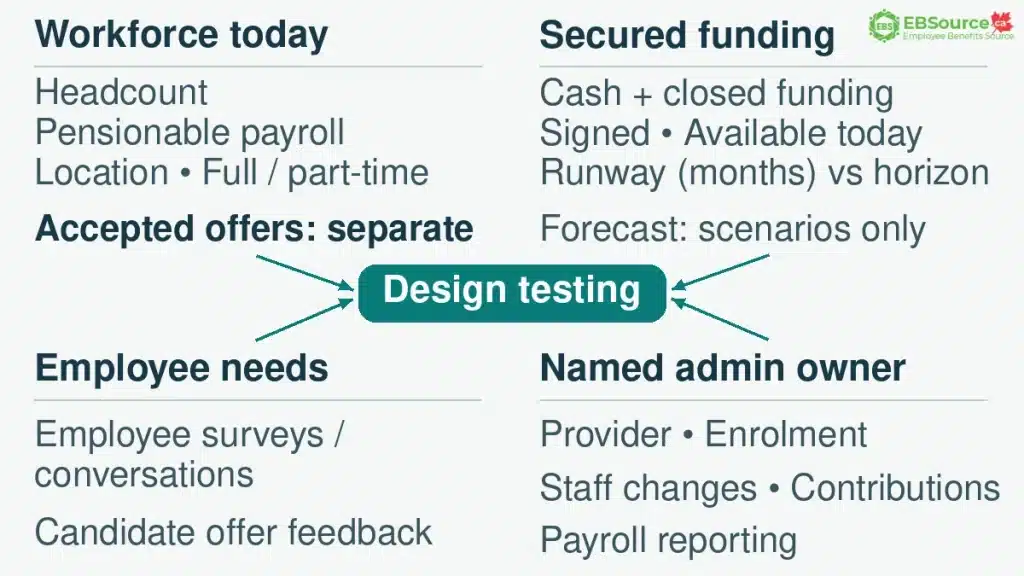
The following sections will explain what to record for each area and why it’s important for testing your designs later on:
Current Headcount and Payroll, Not Projections
Before you can test whether a retirement benefit design is affordable, you need an accurate picture of your workforce today. Base these numbers on the people you currently employ, not on your hiring plan or future projections.
You should confirm and record the following:
- Number of employees on payroll: count only people who are currently employed and paid.
- Where each employee works: some obligations depend on how many eligible workers a company has in one province/territory.
- Full-time or part-time status: some plan types enrol part-time staff on a different schedule.
- Employment status: record who is an employee, who is a founder paid through dividends rather than salary, and who is engaged as an independent contractor. Workplace retirement plans are generally built around employees, and the plan terms decide who can join.
- Current pensionable payroll: when contributions are a percentage of earnings, this is one of the main drivers of employer cost.
- Accepted offers: list separately anyone who has accepted an offer but has not started yet. The funding-delay case in Step 4 treats these hires as already committed.
Decision flag:

If a material part of the workforce is classified as independent contractors, confirm employment status and plan eligibility before including those individuals in the headcount or benefit promise.

A startup retirement benefit design does not settle whether someone is an employee or a contractor, and it should NOT be used to work around that question. Offering employee benefits to a contractor may also affect how the working relationship is viewed.

Where status is unclear, start with the CRA's guidance on employee or self-employed status, and get employment-law advice before relying on the classification.
Note: Use actual figures only. Do not use the compensation budget from your investor deck, because it may include roles that are never filled and salaries that change during negotiation. Put projected headcount and payroll in the Step 4 scenarios, clearly labelled as assumptions.

In this step, you do not need to apply the rules yet. Step 3 sets out the location and part-time rules. It only needs accurate numbers to test them against.
Secured Funding, Not Forecast Funding
A startup’s funding usually falls into two groups:
- Secured funding is money the company can spend today: cash on hand, plus funding commitments that have closed and been signed.
- Forecast funding is everything else, such as a term sheet that has NOT closed, revenue still in the sales pipeline, or a grant application under review.
For this Growth Brief, approve recurring employer contributions only against funding the company has defined as secured. This distinction matters more for startup retirement benefits than for most spending, because an employer contribution that has been promised or paid into the plan can be hard or impossible to take back.
With the two groups separated, work out how many months of runway secured funding gives the company on its own, and check that it covers the full horizon set in Step 1. Predict what happens if the forecast money does not arrive later, in the funding-delay case in Step 4.
Employee Needs, Not Assumed Demand
Do not forget to ask employees before designing startup retirement benefits for them. A short internal survey or a round of conversations will show whether staff already hold Group Registered Retirement Savings Plans (Group RRSPs), whether they would trade salary for an employer contribution, and whether a startup retirement benefit would have changed their decision to join.
In addition, record what candidates have raised in offer negotiations. Do not assume demand that employee or candidate evidence has not shown: that evidence separates a benefit people value from one that adds cost without meeting a real need. The latter steps use this evidence rather than collecting it again.
A Named Admin Owner, Not a Shared Task
It’s easy to underestimate how much administration a retirement benefit needs. A third-party provider or administrator does NOT take on all the work, and tasks loosely shared across the team tend to slip.
As a result, you still have to:
- select and contract with the provider
- enrol employees
- process changes when people join or leave
- deduct and remit contributions on schedule
- make sure payroll reports the benefit correctly
Step 3: Check the Fixed Retirement-Plan Rules Before Scenario Testing
Before testing costs, make sure to record the mandatory rules your company must follow regarding workplace retirement plans. These include Pooled Registered Pension Plan (PRPP), Deferred Profit Sharing Plan (DPSP), Registered Pension Plan (RPP), Quebec alternative, Quebec’s Voluntary Retirement Savings Plan (Quebec VRSP):
| Rule | When it applies | What you must do |
|---|---|---|
| PRPP | Confirm which PRPP legislation applies to each employee group and whether the administrator can accept members in those jurisdictions | Under federal rules, give written notice at least 30 days before entering into the administrator contract. The 60-day opt-out period starts when the membership notice is received. For a federal PRPP, schedule employee deductions to begin no earlier than day 61 after the membership notice is provided. |
| DPSP | You choose a DPSP | Only the employer contributes. Specified shareholders and people related to them or to the employer cannot join. Amounts must vest no later than the later of their allocation and the employee’s completion of 24 consecutive months as a beneficiary under the plan. |
| RPP | You choose an RPP | Confirm CRA registration and the applicable pension regulator. For a multi-jurisdictional plan, determine the major authority under the applicable agreement; changes in membership may require a jurisdiction review. This can change as you hire in other provinces. |
| Quebec alternative | You already offer a payroll RRSP, TFSA or pension plan to all workers | No VRSP needed. If your company is subject to the VRSP obligation, confirm whether each affected employee has access to a qualifying alternative. An existing arrangement may leave a VRSP obligation for employees it does not cover. |
| Quebec VRSP | 5+ eligible employees (18+, with 1 year of service) on Dec 31 and 10+ on June 30 of the next year | Set up a plan by Dec 31 of that next year and automatically enrol eligible employees. Employees may opt out by notifying the employer within 60 days after the administrator sends the statement of participation. Employer contributions are optional and generally locked in for retirement. Access from age 55 depends on the plan and permitted retirement-income options; statutory exceptions may allow earlier payment. The obligation continues once it applies. |
Note: The table separates federal PRPP rules from provincial and Quebec requirements. Federal PRPP provisions do not automatically govern every employee in Canada. Confirm the pension jurisdiction and applicable legislation for each employee group.
Source:
- Pooled Registered Pension Plans Act (S.C. 2012, c. 16) – Government of Canada
- Register a deferred profit sharing plan – Overview – Government of Canada
- 2026 Benefit Amounts and Key Data – Retraite Québec
Step 4: Test the Retirement Benefit Design Against Startup Growth Scenarios
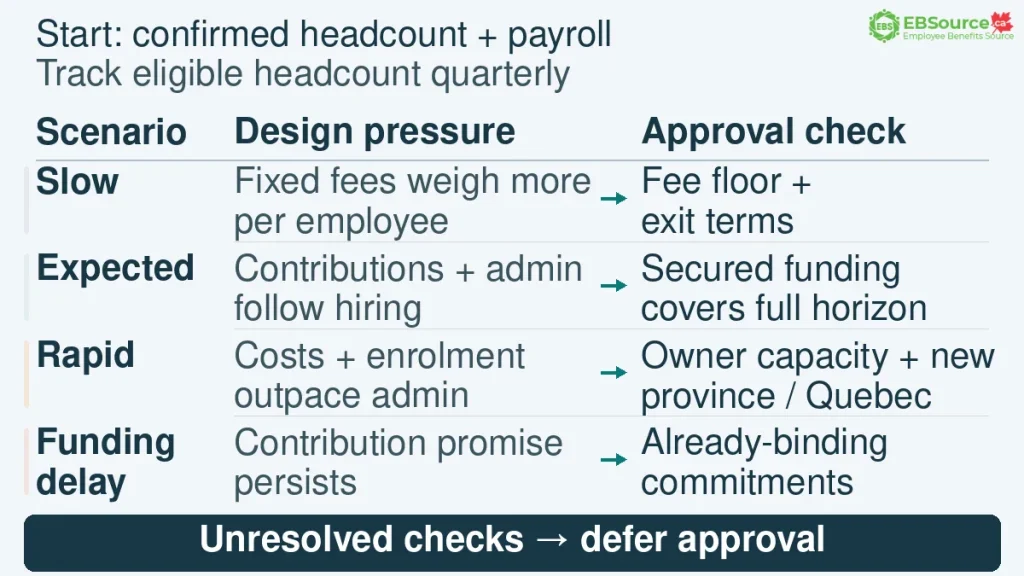
Use the headcount and payroll you confirmed in Step 2 as the starting point. From there, sketch four ways the company could grow between now and the end of your planning horizon. For each path, record eligible headcount by quarter, by province/territory, and by full-time or part-time status.
The table below shows what each path does to the design and what to check before approving it:
| Scenario | What changes in the design | What to check before approving |
|---|---|---|
| Slow path | Fewer participants; fixed provider fees weigh more per employee | Fee floor and exit terms (indicative now, confirmed in Step 6) |
| Expected path | Contributions and admin load follow the hiring plan | Secured funding covers the full horizon |
| Rapid path | Contribution cost and enrolment volume rise faster than admin capacity | Owner capacity; compliance checkpoint for new provinces and the Quebec count |
| Funding-delay case | The contribution promise persists while the cash does not | Which commitments are already binding |
Anything left unresolved in the right-hand column is a reason to defer in Step 7, not a reason to skip the check.
Example: Sizing a Toronto Startup’s Retirement Contribution to Secured Funding
This example shows the budgeting method only. The rates are not a recommended contribution level or a market benchmark, and all figures are illustrative.
Northbeam Labs is a Toronto software startup with 14 employees and a current pensionable payroll of $1,200,000. Two more candidates have accepted offers, with combined salaries of $200,000, and both start in the first quarter. The founders want a 5% employer contribution. The provider’s fee floor is $400 a month, and secured cash can cover $3,500 a month for contributions and fees over the 18-month horizon.
The example assumes an employer contribution on all eligible earnings, rather than a match that depends on employee contributions. It tests contributions and the stated provider fee only.
Here’s how each contribution rate the founders tested measures up against that $3,500 monthly budget, before and after the two new hires start:
| Option tested | Monthly contributions | Monthly total with $400 fees | Fits $3,500 budget? |
|---|---|---|---|
| 5% on $1,200,000 (current payroll) | $5,000 | $5,400 | No, fails from the first month |
| 3% on $1,200,000 (current payroll) | $3,000 | $3,400 | Yes, but only until the two new hires start |
| 3% on $1,400,000 (after new hires start) | $3,500 | $3,900 | No |
| 2.5% on $1,400,000 (after new hires start) | about $2,917 | about $3,317 | Yes, with about $183 of monthly margin |
Northbeam provisionally shortlists a 2.5% employer contribution. Before approval, it must identify the plan structure and add any applicable employer payroll costs, implementation charges and administration costs. The approximately $183 monthly margin is the balance remaining before those additional costs.
The remaining 2.5 percentage points (about $2,917 a month at $1,400,000 payroll) are recorded as a conditional increase, tied to the close of the company’s next funding round.
If Northbeam had tested only its current payroll, it would have approved 3%, a rate its secured cash cannot support once the committed hires start.
Step 5: Test the Retirement Benefit Design Against the Startup Hiring Plan
Step 4 checked whether the company can afford the design and keep it running as it grows. This step checks something different: whether the design actually helps you hire and keep the people you’re planning to hire, at the moments that matter.
A retirement benefit design for startups can pass one test and fail the other. A benefit that fits the budget but launches three months after your key hiring push has passed the cost test and failed the purpose test.
The hiring plan feeds into the design in three ways. It shows:
- which candidates the benefit needs to appeal to
- the date the benefit has to be ready by
- when hiring in a new province will trigger compliance checks
Treat the hiring plan as an input that shapes the design, not as something the design is fitted onto afterward.
Identify the Candidates the Benefit Must Appeal To
Begin with the roles you plan to fill, not with the plan type. For each role or group of hires, ask two questions:
- What will these candidates compare your offer against?
- Is a retirement contribution likely to be part of that comparison?
Candidates from companies with pension plans or matching contributions may see the absence of these benefits as a drawback. Others may not care as much. Therefore, do not assume every candidate group or career stage has the same priorities; use recruitment feedback and offer discussions to test.
If recruitment and employee evidence does not support a retirement benefit as a current priority, compare it with the other compensation and benefit gaps the same budget could address. The appropriate outcome may be a smaller design, a later review date or a decision not to launch yet. Consider leading with retention or long-term savings instead, and size the contribution and communication effort to match.
Set the Launch Deadline from the First Offer
Approve the terms before mentioning the benefit in an offer, and communicate the expected launch and eligibility dates accurately. Use the timing of the first job offer that mentions the benefit as your deadline. Work backward from that date, accounting for the startup retirement benefit setup and notice periods from Step 3, to ensure the benefit is in place by the new hire’s start date. Step 6 will detail the approval process.
It’s important to manage the order of operations for both commitment and recruiting. In addition, wording in an offer letter or employment agreement may create contractual or employment-law obligations. Thus, have the proposed wording reviewed before describing a benefit that has not been finalized. There are two workable approaches:
- keep offer letters silent on the retirement benefit until the plan is approved and contracted, or
- describe the benefit only in terms already approved against secured funding.
Plan Compliance Checks for New Provinces/Territories
When the hiring plan includes a first hire in a new province/territory, add it to the Growth Brief as a review trigger before sending any offer for that role. The trigger re-check rules are in Step 3, and the required actions are in Step 8.
At this stage, timing matters. The new location may need a different plan, a new arrangement with your provider, or a provincial/territorial payroll registration. If so, the recruiting date for that role must allow enough time to put it in place.
Step 6: Approve the Retirement Benefit Terms Secured Funding Supports
By this point, you know what the design costs, where it comes under pressure, and how it fits the hiring plan. Now you decide what the company will actually commit to. Approve and record the following terms:
- the plan type and provider
- the employer contribution level, eligibility and any waiting period
- the launch date, the admin owner, and the employee communication plan
The decisions below build on each other:
Plan Type and Provider
A plan type can be approved when it meets three conditions: it can cover everyone it needs to cover, it’s available in the provinces/territories where your staff work, and it meets any applicable fixed obligation. If one arrangement cannot cover every employee group, document the reason and coordinate any additional arrangement through the same approval and administration process.
Regarding startup retirement plan providers, approve them only after reading the contract and recording five items:
- Fee floor: the minimum annual amount payable at the slow-growth headcount, not the expected one.
- Exit terms: notice period, termination charges, and any per-member transfer cost when leaving.
- Change terms: what the provider can change on its own, and with how much notice.
- Province/territory coverage: whether staff in a planned second location can be enrolled and remitted for under the same agreement.
- Employer fee schedule: items charged to the company, separate from fees deducted from members’ returns.
Contribution Level, Eligibility and Waiting Period
Set the employer contribution based on what the funding can manage, not just what you expect. If there’s a difference, note it as a conditional increase in Step 7. Be aware that once you include a contribution rate in an offer letter or agreement, you may lose some flexibility.
Make design choices based on the rules established earlier. Under federal PRPP rules, eligible full-time employees in the covered class are automatically enrolled. Part-time employees must be enrolled after 24 months of continuous employment, or earlier if the plan permits.
Waiting periods can help manage costs, but ensure they do not conflict with any promises made in offer letters.
Launch Date, Admin Owner and Communication Plan
When approving the launch, consider it as a sequence of dates rather than a single date.
- Pooled Registered Pension Plan (PRPP): the 30-day notice, the administrator contract, the enrolment date, the 60-day opt-out window and the first remittance.
- Other plan types: the provider’s set-up steps and the plan text’s effective date.
Whatever the plan type, check the dates against the recruitment windows from Step 5. For Quebec staff, also check them against the next December 31 and June 30 count dates.
Then, name one admin owner and one backup, by role. Record the monthly hours that the scenario test projected for enrolment, remittances, changes, and payroll reporting. If you cannot designate someone for these roles, the design cannot be approved, regardless of budget considerations.
Next, approve the communication plan as a chronological list of actions. This should include:
- What employees will receive before the launch,
- What they will receive upon enrolment (including details on the opt-out window and any conditions regarding the locking-in of employer contributions), and
- When participation will first be measured against the target.
Note: Before launch, confirm the effective date, employee eligibility, required notices, contribution-room checks and payroll treatment for the chosen arrangement. Test a payroll cycle, then reconcile employee deductions and employer contributions with the administrator’s records. Record remittance deadlines and who will correct errors.
Step 7: Defer Other Startup Retirement Benefit Features Until a Scheduled Review
Keep in mind that not everything you want to offer will get approved right away. If you cannot afford a higher contribution or if no one has shown interest in a certain feature, you do NOT need to discard it. You can revisit it later when you have the funds or supporting evidence.
This step covers the three things most worth holding back: contribution increases, optional extras and provider contracts. It also covers the few things you cannot defer at all. For each item you put on hold, write down what would need to happen before you approve it and who will check at the next review.
Here’s what that looks like in practice:
Defer Contribution Increases Until Funding Is Secured
In Step 6, you set the employer contribution at the level the funding-delay case can carry. If the expected path could support a higher rate, the difference belongs on this list as a conditional increase.
Write the condition so it can be clearly met or not met. For example, a funding round closing triggers a review of the proposed increase; approve the higher rate only after confirming available funds, updated payroll, total cost and any required plan or contract changes. Until then, do not mention the higher rate to candidates or employees. If the plan type makes the employer contribution optional, you may start low and increase it later, as long as employees have only been told about the lower rate.
When documenting the potential increase, specify the dollar amount per month based on the current payroll plus accepted job offers. If the hiring plan increases payroll before funding is secured, adjust the recorded amount accordingly. This helps show what the company would need to secure if it approves the increase and funding does not come through.
Defer Optional Features Until Employee Demand Is Clear
The following features can increase costs or complexity in administration:
- matching formulas that step up with tenure
- additional voluntary contribution options
- investment menus beyond the default
- education sessions beyond what the provider bundles
- spousal or family features
Hold these back until participation and feedback measures from Step 1 show results. If employees keep asking for a particular feature, the next review can weigh that demand against its cost, admin work and any limits set by the plan.
One exception applies in Quebec. Under a Voluntary Retirement Savings Plan, the registered plan sets the investment options, not the employer. That means the employer cannot defer or expand the investment menu.
Defer Provider Contracts Until They Pass the Step 6 Review
Some contract terms are especially hard to undo, such as a multi-year agreement, a minimum fee guarantee or exit charges. Do NOT sign a contract that includes any of these until you have read and recorded all provider items from Step 6. If even one of them is still unknown, the contract waits. The condition for approving it is simple: get the missing information in writing.
Do Not Defer Fixed Obligations or Existing Commitments
Deferring is a choice about optional spending, so it applies only to decisions the employer can still postpone. Some items never belong on the deferral list:
- any fixed obligation recorded in Step 3
- any obligation already set by the plan text
- any commitment already made to employees, such as a rate promised in an offer letter or employment agreement
If you want to change something already committed, it goes through the Step 8 review process instead. Review the governing documents and get professional advice first.
Step 8: Set Review Triggers for the Startup Retirement Benefit
A review is triggered when headcount or payroll moves beyond the planning assumptions, funding or ownership changes materially, the company hires in a new province or country, participation falls below target, employee feedback turns negative, or provider fees rise materially, or the share of the workforce engaged as contractors changes, including when a contractor moves to employee status.
Write each trigger into the Growth Brief as a measurable condition with an admin owner, so a review happens because a number was crossed, not because someone remembered.
A review reopens the design from Step 2 onward:
- inputs are re-confirmed
- the Step 3 compliance checkpoint is re-run
- the scenarios are rebuilt from the new hiring plan
- the approved and deferred columns are re-sorted
Monitor triggers throughout the planning horizon and review the design when one occurs. Schedule a full review before the horizon ends.
When Should a Startup Get Professional Advice Before Committing?
Startups should consult a pension or benefits advisor, a tax professional, or an employment lawyer before proceeding if their plans go beyond a simple, single program in one province/territory. The Growth Brief can help organize decision-making, but it should not replace plan-specific advice in the following situations:
- Quebec threshold: the company is approaching the CNESST count, or already has Quebec staff and an existing plan that may not cover all eligible workers.
- Multiple provinces: staff work in more than one province, and plan availability, jurisdiction or payroll set-up differs between them.
- Registered Pension Plan: the design is a registered pension plan, with its own registration, funding and regulator requirements.
- Cross-border hire: a candidate or employee will work outside Canada.
- Reducing an existing commitment: a proposal would lower a contribution or change an enrolment term already communicated to staff.
- Owner or shareholder eligibility: a DPSP is proposed for a team where founders, shareholders or related individuals may be excluded.
- Worker classification: a material part of the team is engaged as independent contractors, or a contractor’s role is expected to change to employee status.
Make sure to document in the Growth Brief which situations apply and who was consulted. This way, the next review can be based on the advice received rather than relying on memory.
Your Next Step: Complete the Growth Brief using current payroll, accepted offers, secured funding, employee locations and the hiring plan. If the plan structure is still undecided, compare the options in Small Business Retirement Plans before requesting provider quotes. If a Quebec threshold, a multi-province workforce, a registered pension plan or an existing employee commitment is involved, confirm the design with the appropriate advisor before launch.
FAQs Related to Retirement Benefits for Canadian Startups
Is a Canadian Startup Ever Legally Required to Offer a Retirement Savings Plan to Employees?
Yes, for some provincially regulated employers in Quebec. The obligation depends on the CNESST eligible-worker counts described in Step 3, and it continues once it applies. Outside that Quebec framework, the federal sources reviewed for this guide set no general requirement for every employer to offer a retirement plan. Confirm any provincial/territorial requirement with the regulator in each province where employees work.
Can part-time employees be left out of a startup retirement plan?
It depends on the plan. A PRPP cannot keep excluding a part-time employee in the chosen class once the 24-month continuous-employment condition is met. Quebec VRSP eligibility is based on age and service, full-time or part-time. For a Group RRSP or DPSP, the plan terms and applicable rules decide. Whatever the plan allows, approve the rule deliberately and tell employees before launch.
Can Founders Take Part in the Retirement Plan?
It depends on the plan. Founders who are paid employees can usually join a Group RRSP or a PRPP. A DPSP excludes specified shareholders, which generally means anyone holding 10% or more of any class of shares, along with people related to them or to the employer. This is one of the situations where the article recommends professional advice. If founders are left out of a DPSP, you may need a separate way to include them.
What is the First Thing to Check When a Startup Makes Its First Hire in a New Province?
Re-run the Step 3 compliance checkpoint before telling the candidate anything about retirement benefits. Then confirm that the provider and payroll can support the new province. Use the Step 3 rules, the provider checks in Step 6 and the review process in Step 8.
Is It Better to Launch a Small Employer Contribution Now or a Larger One After Funding Closes?
Launch the contribution that secured funding supports across the full planning horizon, including hires already committed, and record the larger figure as a conditional increase tied to a named funding event. A stated or remitted contribution can be hard to reverse. The Northbeam example in Step 4 shows how to size both figures.
What Happens to the Plan if the Startup is Acquired or Shuts Down?
Treatment depends on the arrangement. Amounts already contributed to an employee’s Group RRSP are held in that employee’s RRSP, subject to the plan’s contractual withdrawal rules. PRPP funds remain subject to the applicable pension legislation and transfer rules. In a DPSP, vested amounts are payable to the beneficiary, while unvested amounts may be forfeited and then reallocated or refunded to the employer as the plan terms and tax rules permit.
In an acquisition, the buyer may keep the plan, merge it into its own, or end it. Employees’ balances would then be moved according to the plan’s rules. Locked-in money has to stay locked in when it moves.
An acquisition and a shutdown require different reviews. Confirm each arrangement’s treatment of member balances, any unvested DPSP amounts, outstanding contributions, transfers and termination notices.