
Income Tax for Employees in Canada: How it Works, Payroll Deductions, Tax Slips


In Canada, employees have their income tax handled through their employers. Before getting paid, employers deduct federal and provincial taxes, as well as contributions to the CPP and EI. There are two types of deductions: statutory (required by law), such as income tax, CPP, and EI, and voluntary (optional), such as retirement and union contributions.
At tax time, employees need to collect various tax slips, mainly the T4 from each employer, along with any other slips like T4A, T4E, T5, or T5007 that report other income and tax details.
For more information about how each part of this process operates, the payroll deductions and the necessary slips, read the article below.
How does Income Tax Work for Employees in Canada?
In Canada, employers automatically withhold income tax, CPP contributions, and EI premiums from each paycheck based on the employee’s salary and TD1 information. At the end of the year, employees receive a T4 slip detailing these amounts.
Canada uses a progressive income tax system with five federal tax brackets. This means that employees pay higher tax rates only on the income that exceeds the limits of each bracket, not on their whole income.
In addition to federal taxes, each province and territory in Canada imposes its own income tax with distinct brackets and rates. The province or territory you lived in on December 31, 2025, will determine the tax rates you pay for that year. This means that two Canadians with the same income might end up paying different total taxes depending on where they lived at that time. To see how your province impacts your estimated total, use our Canadian income tax calculator.
Employees also receive a BPA tax credit that allows part of their income to be tax-free, helping lower-income workers. The total tax paid depends on federal and provincial rates, how often an employee is paid, and what they claim on the TD1 form.
As an employee, you do not need to calculate or pay taxes yourself. Your employer will withhold federal and provincial taxes, as well as contributions for CPP or QPP, and EI premiums from your pay and send them to the CRA for you. This is based on payroll deduction tables and the information you provide on your TD1 form.
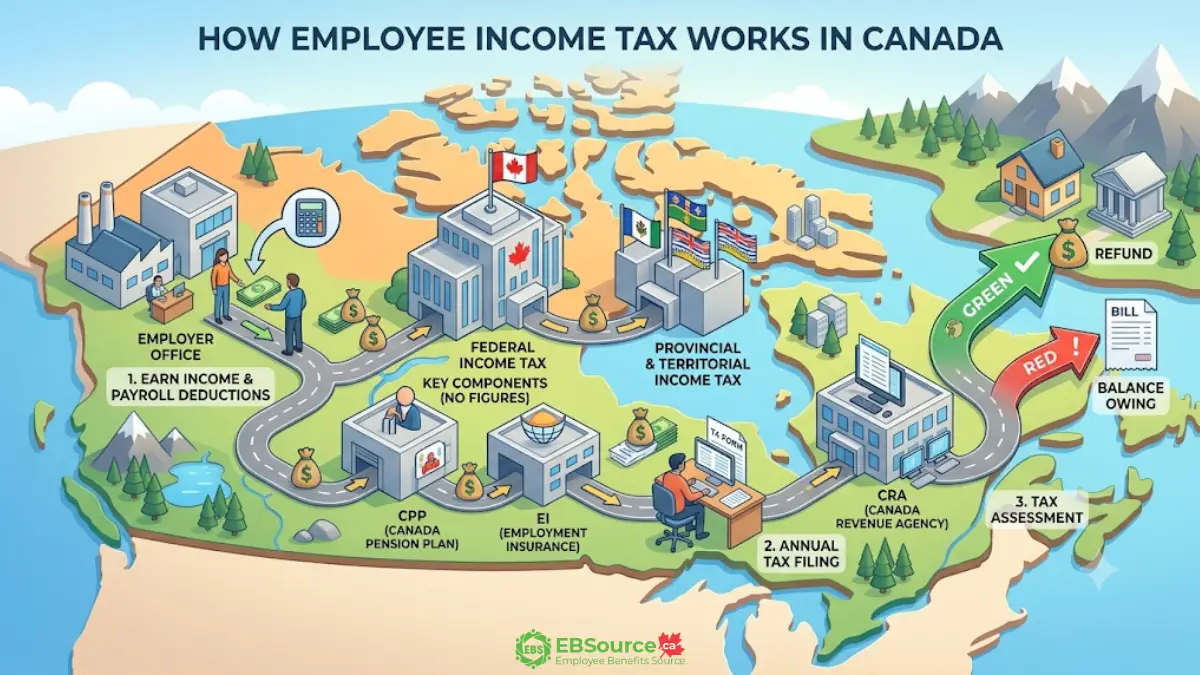
What are the Payroll Deductions Allowed in Income Tax?
In Canada, payroll deductions are classified into two categories: mandatory and voluntary. Mandatory deductions are required to be withheld from your paycheck and submitted to the CRA, such as income tax, CPP contributions, and EI premiums. However, voluntary deductions are optional, usually involve benefits or other agreements, and require your written consent before they are deducted from your pay.
The two categories of payroll deductions permitted for income tax purposes are explained below.
Statutory Payroll Deductions
Common non-refundable tax credits that lower your federal tax include the BPA, CPP or QPP contributions credit, EI premiums credit. Each of these credits is calculated using the lowest federal tax rate to see how much tax you can reduce. While these credits can bring your federal tax down to zero, they will not create a refund on their own.
Here are the non-refundable tax credits you should understand when reviewing your tax return:
Income Tax Deducted (T4 Box 22): This represents the estimated tax owed based on your earnings and TD1 credits.
CPP or QPP Contributions (T4 Box 16 or 17): This shows your share of contributions to the CPP or QPP.
EI Premiums (T4 Box 18): These are Employment Insurance premiums deducted until you reach the annual maximum.
Moreover, CEA, tuition amount, spouse or common-law partner amount, medical expenses, and the disability tax credit may also be deducted from gross pay.
Basic Personal Amount: This credit is automatic and requires no supporting documentation.
Canada Employment Amount: This is an automatic credit for those with employment income, applied by tax software.
Tuition Amount (Schedule 11, T2202 slip): If you do not need the full credit to reduce your tax to zero, you may transfer up to $5,000 ofthe unused portion to a family member, or you can carry it forward to a future year.
Spouse or Common-Law Partner Amount: If your spouse or common-law partner earned less than the BPA, you may be able to claim the difference using Schedule 5.
Medical Expenses: You can claim eligible medical expenses you paid in any 12-month period that ends in the tax year. For the federal calculation, subtract the smaller amount between 3% of your net income and a fixed threshold amount from your eligible expenses.
Disability Tax Credit (Form T2201): This credit is available if you or a dependent has a Disability Tax Credit certificate. This credit can also be transferred from a dependent if they do not need it.
Voluntary Payroll Deductions
RPP and RRSP contributions, union dues, child care expenses, and moving expenses are withheld from each employee’s paycheck. The total amounts are summarized on your T4 slip at the end of the year.
The following amounts are deducted from each paycheck:
- RPP Contributions (T4 Box 20, if applicable): This reflects your contributions to a registered pension plan through your employer.
- RRSP Contributions (Schedule 7, if applicable): These are contributions to a registered retirement savings plan. Your contribution limit for the year is provided on your most recent notice of assessment.
- Union Dues (T4 Box 44, if applicable): These are dues paid to a union or professional association that are required for your employment.
- Child care expenses (Form T778, if applicable): This represents the amounts paid for child care so that you or your spouse or common-law partner could work, attend school, or conduct research.
- Moving expenses (Form T1-M, if applicable): If you moved at least 40 kilometres closer to a new place of work or post-secondary study.
These deductions lower your total income to determine net income or adjust net income to find taxable income. Each deduction requires supporting documentation, and certified tax software will prompt you for the related amounts.
What Tax Slips do Employees Need for Income Taxes?
The most common tax slips that employees encounter include T4, T4A, T4E, T5, and T5007. These slips are issued by employers, payers, and financial institutions that report your income, deductions, and credits.
Each of them reports in numbered boxes that correspond to specific lines on the T1 form. If you use certified tax software, it will automatically map this information when you enter or import your slip data.
Here are the typical tax slips and the corresponding boxes that you need to prepare:
A T4 slip is provided by your employer for reporting employment income. Key boxes on the tax forms include box 14 (total employment income), box 16 (CPP contributions), box 18 (EI premiums), box 20 (RPP contributions), box 22 (income tax deducted), and box 44 (union dues). Most of these amounts are directly transferred to specific lines on the T1 tax return.
A T4A slip is issued by different payers for various types of income, including box 105 (scholarships, fellowships, and bursaries), box 042 (RESP educational assistance payments), box 040 (RESP accumulated income payments), and box 32 (RPP contributions that are not reported on a T4).
A T4E slip is issued by Service Canada. The key box is box 14, which shows total EI benefits (reported on line 11900, with adjustments if Box 18 applies). Some tuition assistance is taxable and included in Box 14 (Box 20). Non-taxable tuition assistance is in Box 21 and goes on line 25600; it does not qualify for a non-refundable tax credit.
A T5 slip is issued by financial institutions to report interest, dividends, and other types of investment income. If your total earnings are less than $50, you may not receive a T5 form. However, it is important to report this income by reviewing your account statements. Any income not reported on an information slip must still be declared on your tax return.
This T5007 slip reports social assistance payments and workers’ compensation benefits. The most important information is found in box 11, which indicates the amount of social assistance payments received.
The T5008 slip reports securities transactions, including purchases and sales, which are used to calculate capital gains or losses on Schedule 3.
Additional tax slips may be relevant depending on your sources of income, including T3 slip (trust income), T5013 slip (partnership income), T2202 slip (tuition), T4FHSA (First Home Savings Account), and RRSP/PRPP contribution receipts. Each of these corresponds to specific lines on the return, and certified tax software helps guide you through the entry process.
When Should Employees Receive their Tax Slips?
Most tax slips should arrive by the end of February, but some, such as T3 and T5013 slips for trust and partnership income, may arrive by the end of March. Additionally, RRSP or PRPP contribution receipts for the first 60 days of 2026 could arrive as late as May.
Important reminder: If you have worked for multiple employers, you will get a T4 slip from each one. If a slip is missing or late, check your CRA My Account to see if it was filed electronically, or contact the issuer directly. If you still can not get it by the filing deadline, use your pay stubs and records to estimate the amounts and include an explanation with your return.
What are the Canadian Forms Employees Need to File Income Taxes?
Beyond tax slips, employees may need to complete specific forms and schedules depending on their sources of income, deductions, and credits. The T1 Income Tax and Benefit Return is the main tax return, but several supporting documents are required, such as T2125, T776, T777, T2200, T2202, T1213, and GST370.
The following section clarifies the meaning of each form:
- T2125 Form (Statement of Business or Professional Activities): This form is used to report revenue and expenses from self-employment, freelancing, or a professional practice.
- T777 Form (Statement of Employment Expenses): Claims eligible job-related expenses like home office costs and vehicle expenses.
- T2200 Form (Declaration of Conditions of Employment): A form from your employer confirming necessary job-related expenses, needed before claiming on T777.
- T1213 Form (Request to Reduce Tax Deductions at Source): A request to the CRA to reduce tax deductions from your pay if you expect high expenses or contributions, allowing you to take home more money each paycheck.
- GST370 Form (Employee and Partner GST/HST Rebate): A rebate for employees who can recover GST/HST on claimed employment expenses.
For employees, the TD1 Personal Tax Credits Return is a separate form that they need to submit to their employer, not to the CRA. It helps the employer determine how much tax to withhold from employees’ paychecks. While it is not part of an employee’s T1 tax return, the credits they claim on the TD1 affect their tax deductions throughout the year.
Note: One form that often confuses is the T2 Corporation Income Tax Return, which is specifically for corporations, not individuals. If you are filing personal taxes, you do not need to fill out a T2.
Beyond that, the three schedules most tax filers encounter are Schedule 1 (federal tax calculation, used to apply non-refundable tax credits against federal tax), Schedule 3 (capital gains or losses from the sale of investments, property, or other capital assets), and Schedule 4 (statement of investment income, used to detail interest and dividends).
How do You Understand Canadian Income Tax?
The Canadian system uses a “funnel” method, starting with your total earnings and subtracting amounts to get your final tax bill. Therefore, understanding Canadian tax reports requires knowledge of specific “line numbers,” such as line 15000, line 23600, and line 26000.
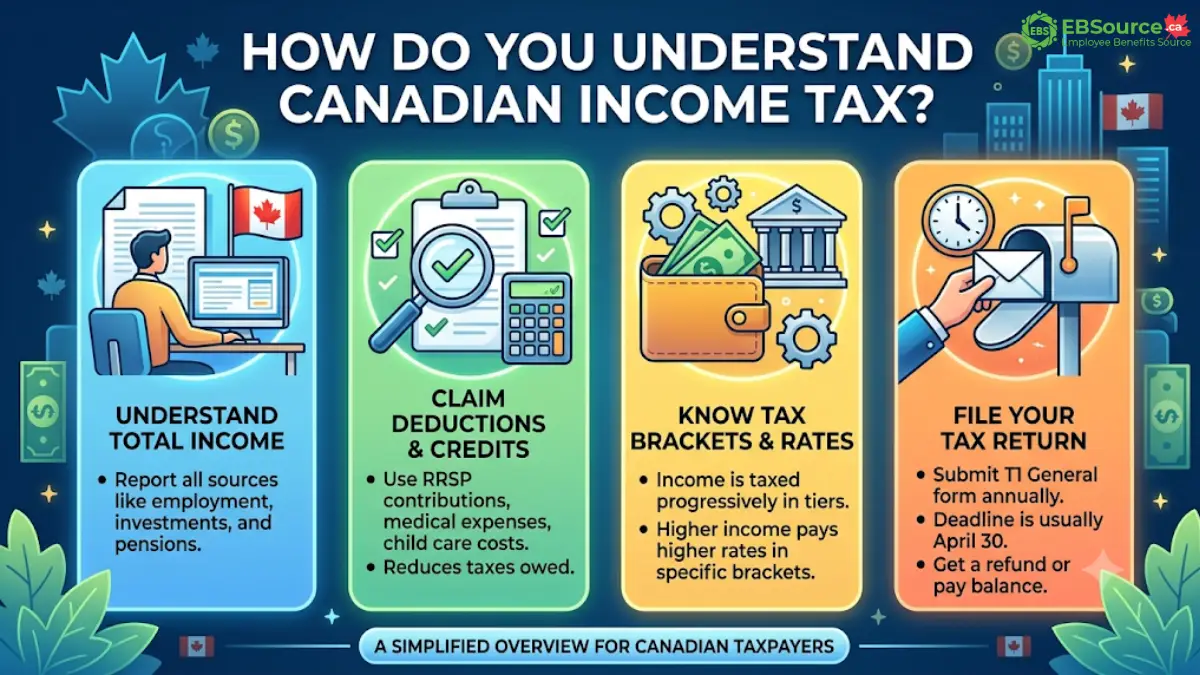
To read the report, you need to differentiate between these three key totals:
Total Income (Line 15000): This represents your income from every source, both inside and outside Canada. This includes income from employment, investments, EI benefits, scholarships, and any other amounts, such as cash tips or self-employment earnings.
Net Income (Line 23600): This figure is used by the government to determine if you qualify for benefits like the Canada Child Benefit and the GST/HST credit, and it also helps calculate certain non-refundable tax credits. If you are using certified tax software, these calculations will be done for you automatically.
Taxable Income (Line 26000): This final amount is used to determine the federal and provincial or territorial taxes you owe. To lower your taxable income, claim any remaining deductions, such as capital gains deductions and losses from previous years. It is calculated by subtracting any additional adjustments, such as losses from previous years, from your net income.
How to File the Workplace Canadian Income Tax Return
You can file your taxes electronically using certified software and NETFILE, on paper by mail, through SimpleFile if invited, or with assistance from a free tax clinic or a professional preparer. All these methods submit the same T1 return to the CRA, so choose the one that best suits you.
The table below compares the four main methods for filing your income tax return:
| Filing method | How it works |
| Certified tax software with NETFILE | Complete your return in software, then transmit electronically to the CRA. |
| Paper return | Complete T1 package and Form 428; mail to your tax centre or request a drop-off option. |
| SimpleFile | Free CRA services are available with multiple filing options: phone, digital, and paper for eligible individuals with lower income and simple situations. |
| Free tax clinic or professional tax preparer (EFILE) | A volunteer or authorized representative completes and files on your behalf. |
4 ways to file the income tax return
To change your address or name, you cannot do so through NETFILE. Instead, you can update your address on a paper return or when a tax preparer files through EFILE. It will update once the return is processed. For name changes, you need to follow CRA’s phone or mail instructions, as they do not accept changes online.
Tax Year Deadline for the Return
Your personal tax return reports income for the tax year, which runs from January 1 to December 31. Generally, you will file your return the following spring.
Most individuals must file and pay their taxes by April 30, 2026, if they are filing the 2025 return during the 2026 tax season. However, if you or your spouse/common-law partner has self-employment income, the filing deadline is June 15, 2026. Keep in mind that any balance owed is still due by April 30, 2026.
Always confirm deadlines if you are a non-resident, filing for a deceased person, or have any other special circumstances.
What Happens After Filing a Canadian Income Tax Return
After you submit your tax return, the CRA will send you a notice of assessment (NOA) to let you know if you get a refund, owe money, or neither. How quickly you receive your NOA depends on how you filed your return. If you filed a return that needs a detailed review, it may take longer. You can check your status online in your CRA account or by calling 1-800-959-8281.
If you are owed a refund, the CRA pays interest starting 30 days after the due date, 30 days after you file, or the day you overpaid taxes. Additionally, you can also choose to apply your refund to your 2026 instalment account when filing electronically, or include a note with your paper return.
If you owe money to the CRA, you can pay in these 5 following ways:
- Online Banking: Add the CRA as a payee through your bank or credit union.
- My Payment: Make a one-time payment with a debit card (no credit cards).
- Pre-Authorized Debit: Schedule automatic withdrawals from your bank account via My Account.
- Canada Post: Pay with debit or cash at a retail location (fees may apply).
- Cheque by Mail: Send a cheque from a Canadian bank.
Furthermore, you can pay at a bank or credit union counter using a remittance voucher, or through third-party service providers that accept credit cards, Interac e-Transfer, or PayPal (service fees may apply).
Payment safety notice: The CRA provides approved payment methods. The CRA also specifies payment types it does not accept, such as cryptocurrency, gift cards, cash by mail, or foreign funds. Always verify on canada.ca before making a payment.
FAQs about Income Tax in Canada
Why do you need to file a Canadian income tax return every year?
Filing your tax return annually allows the CRA to calculate your tax owed and determine your eligibility for benefits such as the Canada Groceries and Essentials Benefit, the CCB, and the GIS. Even if you had no income during the year, submitting your return ensures that the CRA has the necessary information to issue any benefits and credits you may be entitled to.
Is there a minimum income amount required before I have to file a tax return?
No. Canada does not require a minimum income to file taxes. You must file if you owe taxes, sold capital property, or need to repay benefits like OAS or EI. Even if you have no income, filing ensures the CRA can assess your eligibility for benefits like the Canada Groceries and Essentials Benefit and the Canada Child Benefit. If you skip a year, these payments might stop until the CRA gets your missing return.
What happens if I realize I made an error after submitting my return?
Wait for your NOA from the CRA before asking for changes. After you receive it, you can adjust your return in three ways: use the ReFILE service in your tax software, the “Change my return” feature in CRA My Account, or send a completed Form T1-ADJ by mail. You can make changes for the past 10 tax years.
Processing times vary over time. As of December 8, 2025, the CRA indicates that online changes (ReFILE / Change my return) will take about 2 weeks, while paper requests (T1-ADJ or a signed letter) will take about 12 weeks.
Can I file my return before all my tax slips are available in Auto-fill My Return?
Yes. You do not need to wait for the Automated Filing Report to be fully populated before filing your taxes. If you have all your physical or digital slips available, you can manually enter the information and file before the deadline.
Auto-fill may be incomplete at the beginning of the season. The CRA notes that some slips might not be available in its systems by early April. If you are missing a slip, try to obtain it from the issuer or refer to your own records. Be sure to file on time and retain your supporting documents.
Article Source
Disclaimer: This article provides general information relevant to Canada and may not accurately represent your specific tax situation. Tax rules can vary by tax year and by province or territory (note that Quebec has its own provincial administration). For official guidance and the latest regulations, please consult the CRA or a qualified tax professional.